Smart home technology is reshaping single-family rentals, offering convenience for tenants and cost savings for landlords. Here’s what you need to know:
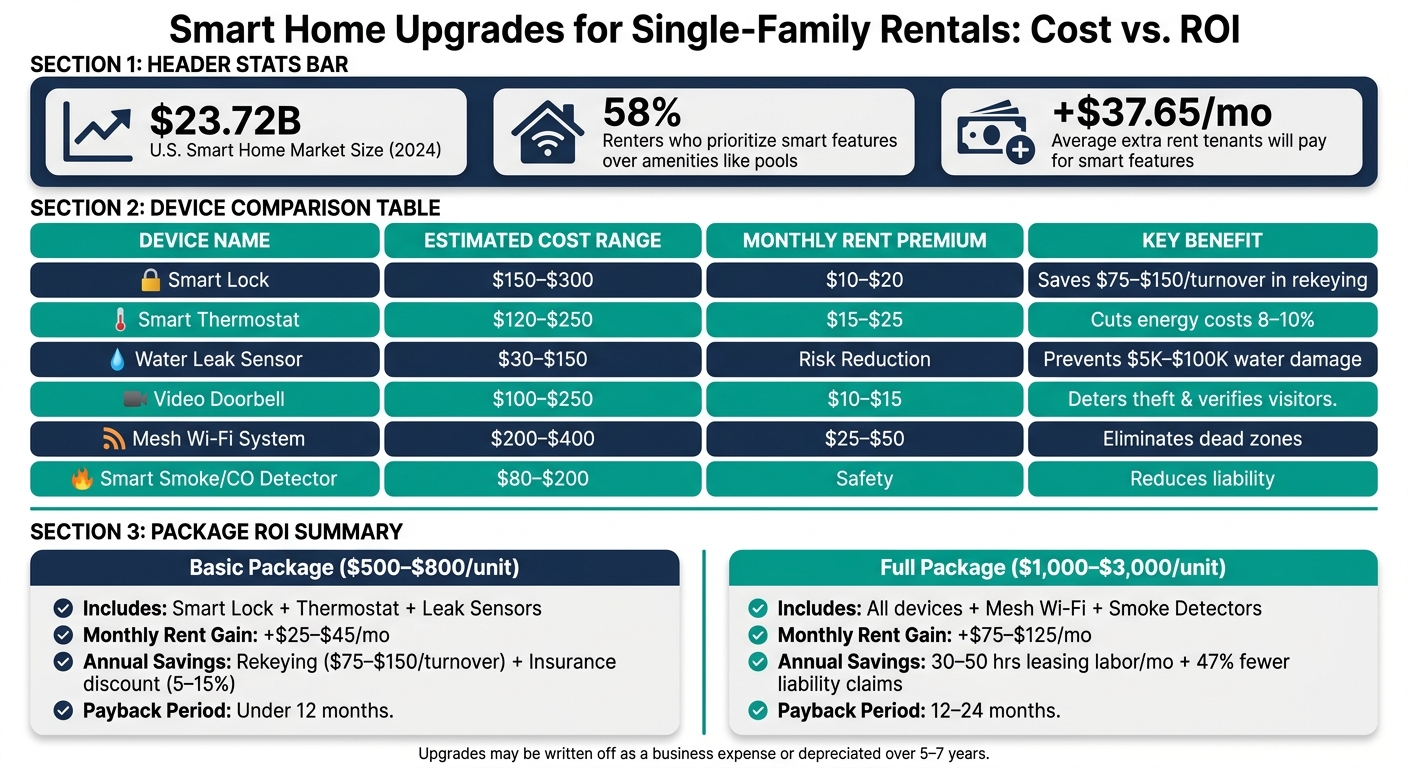
- Market Growth: The U.S. smart home market hit $23.72 billion in 2024 and is growing at 23.4% annually through 2030.
- Tenant Demand: 58% of renters prioritize smart features over amenities like pools, willing to pay an extra $37.65/month on average.
- Landlord Benefits:
- Rent increases of 4.4% for smart-enabled properties.
- Savings on rekeying ($50–$100 per turnover) and water damage prevention (repairs can cost $5,000–$100,000).
- Insurance discounts of 5–15% with connected security systems.
- Key Devices:
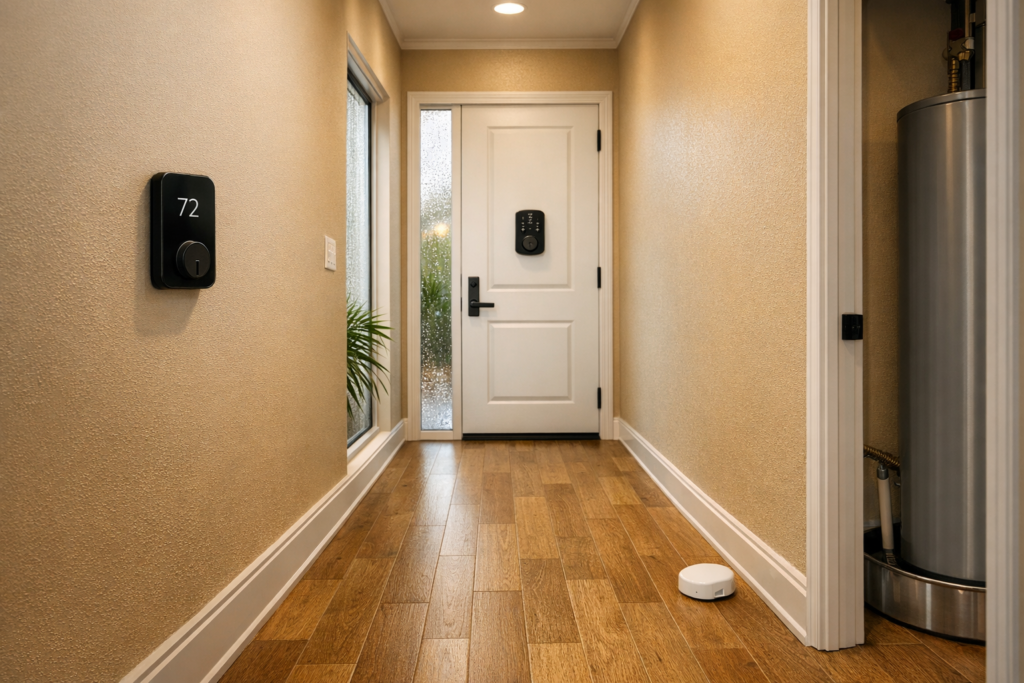
- Smart locks ($150–$300): Simplify access and save on rekeying.
- Smart thermostats ($120–$250): Cut energy costs by 8–10%.
- Leak sensors ($30–$150): Prevent costly water damage.
- Video doorbells ($100–$250): Improve security and package monitoring.
- Jacksonville-Specific Tips:
- Use devices to handle Florida’s heat, humidity, and storm risks.
- Opt for durable, water-resistant devices for outdoor use.
Smart upgrades not only make properties more appealing but also help landlords save time and money. Whether you’re managing one property or several, smart tech is becoming a must-have for rental success. If you need help implementing these upgrades, consider choosing a property management company in Jacksonville to oversee your portfolio.
Benefits of Smart Home Technology for Owners and Tenants
Owner Benefits
Smart home upgrades come with clear financial perks. According to a Zillow analysis, properties with smart features can achieve a 4.4% rent increase compared to similar units. On top of that, individual devices can add $10–$50 per month in rent premiums, and smart locks alone can save $150–$300 in rekeying costs per tenant turnover.
These devices also reduce liability risks. Properties with access monitoring systems experience 47% fewer liability claims related to unauthorized entry. In Florida, certain insurers even offer 5–15% discounts on homeowner policies for properties equipped with connected security systems. Additionally, a simple water leak sensor costing $50–$150 can prevent water damage that typically averages $10,000 per claim.
"A smart thermostat that prevents a burst pipe during a vacancy has already paid for itself several times over on that one event." – Nick Wiese, Regional Vice President, Priority One Heating & Air Conditioning
For owners managing multiple properties, the operational savings are substantial. Remote vendor access eliminates unnecessary trips to the property, and self-guided tours through smart locks can save 30–50 hours of leasing labor per month. These efficiencies contribute to a smoother operation and pave the way for benefits that tenants also appreciate.
Tenant Benefits
Smart devices provide tenants with practical, everyday advantages beyond just being trendy. Keyless entry eliminates the hassle of lost keys or lockouts. Tenants can unlock doors remotely for repair technicians, family members, or even dog walkers without needing to be home. Smart thermostats, which learn usage habits and adjust automatically, help reduce energy bills by 8–10%, a welcome saving during Florida’s sweltering summers.
Safety is another big plus. Video doorbells allow tenants to screen visitors and monitor package deliveries with two-way audio. As porch theft becomes more common, this feature is becoming less of a luxury and more of a necessity. The growing willingness to pay for these features shows that demand is real and not just a passing fad.
"A landlord offering keyless entry is already communicating something about how they run things before a tenant even sees the unit." – Jeffrey Zhou, CEO and Founder, Fig Loans
Privacy and Legal Considerations
While smart technology offers numerous benefits, it also requires landlords to carefully manage tenant privacy. In Florida, landlords must respect tenant privacy even if they own the installed devices. For instance, reviewing entry logs without a valid maintenance or security reason could lead to disputes or legal issues.
The rules for privacy are straightforward: cameras should only be placed in exterior areas like the front door, driveway, or backyard – never inside the home. Including a dedicated smart home clause during lease execution is essential. This clause should outline what data is collected, who can access entry logs, and how devices will be managed during and after the lease. Before a new tenant moves in, always perform a factory reset on all devices and update access credentials. This ensures the incoming tenant’s privacy and limits your liability.
Battery-powered smart locks are particularly useful in Florida rentals. These locks store access codes locally rather than in the cloud, meaning they continue to function during power outages – an important feature during hurricane season. This reliability benefits both tenant safety and owner peace of mind.
The financial and operational advantages outlined here tie directly to the broader goals of smart home upgrades. The upcoming sections on planning, device selection, and installation will expand on how to maximize these benefits step by step.
sbb-itb-73b3b1a
Planning and Budgeting for Smart Home Upgrades
Smart Home Upgrades for Rentals: Costs, Benefits & ROI
Setting Your Smart Tech Goals
Before diving into smart home upgrades, it’s crucial to define your main goal. Are you looking to enhance property protection, cut down on expenses, or make your rental more appealing to tenants? For most landlords, starting with a smart lock, thermostat, and water leak sensors covers the basics.
In Jacksonville, where the humid climate poses unique challenges, energy management becomes especially important. A smart thermostat can help maintain a safe temperature in vacant units, reducing the risk of mold or HVAC issues. This simple step can save you from costly repairs.
Once you’ve identified your goals, take a closer look at the costs associated with various upgrade levels to find what works best for your property.
Cost Breakdown by Package Level
Smart home upgrades don’t have to break the bank. A basic setup focusing on essential devices can cost between $500 and $800 per unit, while a more advanced package – including extras like a video doorbell, mesh Wi‑Fi, and smart smoke detectors – typically ranges from $1,000 to $3,000. Here’s a breakdown of device costs and potential rent premiums:
| Device | Estimated Cost | Monthly Rent Premium |
|---|---|---|
| Smart Lock | $150–$300 | $10–$20 |
| Smart Thermostat | $120–$250 | $15–$25 |
| Water Leak Sensors | $30–$150 | Minimal (risk reduction) |
| Video Doorbell | $100–$250 | $10–$15 |
| Mesh Wi‑Fi System | $200–$400 | $25–$50 |
| Smart Smoke/CO Detector | $80–$200 | Minimal (safety) |
| Professional Installation | $200–$500 per property | N/A |
With a basic setup, you could see $25–$45 per month in additional rent income. A full package, on the other hand, might bring in $75–$125 per month. Plus, you’ll save on rekeying costs (around $75–$150 per turnover) and could qualify for insurance discounts ranging from 5–15% with certain Florida carriers. Thanks to these benefits, many devices pay for themselves in under a year.
"The question is always about upfront cost. But the smarter question should be about what the alternative costs over time."
- Nick Wiese, Regional Vice President, Alpha Heating & Air
In areas like the Westside, professional installation for smart locks and thermostats typically costs $100–$200 per lock. Additionally, these upgrades can be written off as a business expense in the year they’re installed or depreciated over 5–7 years.
Infrastructure Requirements
Before installing any smart devices, check the property’s internet coverage. larger single-family homes, which are common in Jacksonville’s Southside suburbs, often face signal interference or dead zones. Investing in a mesh Wi‑Fi system like Eero or Google Nest WiFi (priced around $200–$400) can resolve these issues and ensure reliable connectivity for devices like exterior cameras, garage controllers, and smart locks.
Power reliability is another key factor in Florida. Choose smart locks that store codes locally and include a physical key override or an external battery terminal. These features ensure the locks remain functional during power outages. In fact, 92% of property managers reported no tenant lockouts when these backup systems were properly maintained.
For a more robust setup, consider the Ring Alarm Pro. It combines a security hub with a built-in Wi‑Fi 6 router and cellular backup, keeping the property connected even if the tenant’s internet service goes down. Whichever hub you choose, maintain admin-level access to devices and the Wi‑Fi network. This allows you to reset systems easily during tenant turnovers while granting residents limited "guest" or "resident" access.
Lastly, outdoor devices in Jacksonville face challenges from salt air and humidity, which can lead to corrosion. Opt for devices rated IP55 or higher for water and dust resistance, and look for marine-grade coatings to extend their lifespan.
Key Smart Devices for Single-Family Rentals
Once you’ve established your goals and budget, the next step is choosing the right smart devices to meet those objectives.
Smart Locks and Access Control
Smart locks allow for flexible access control, making property management more efficient. You can issue temporary codes for maintenance workers, enable self-guided tours for prospective tenants, and revoke access immediately once a lease ends. These features streamline tenant transitions while reinforcing the security and cost benefits discussed earlier.
Two standout options for single-family rentals include:
- Schlage Encode Smart WiFi Deadbolt ($250–$300): This lock has built-in Wi-Fi, eliminating the need for a separate hub. It also boasts an ANSI Grade 1 security rating, the highest for residential locks.
- August Wi-Fi Smart Lock ($150–$250): Designed for retrofitting, this lock fits over the interior of your existing deadbolt, leaving the exterior hardware unchanged. This makes it a great choice for properties in HOA communities or situations where you want to maintain the door’s original appearance.
Both models include physical key overrides, which is particularly useful in areas like Florida, where power outages are common.
Smart Thermostats and Climate Control
Smart thermostats are a win-win for landlords and tenants. They help protect HVAC systems and reduce energy costs. In Jacksonville’s heat and humidity, leaving a thermostat unchecked in a vacant property could lead to mold growth or even compressor failure. By setting temperature limits – like preventing cooling below 68°F or heating above 72°F – you can avoid unnecessary strain on the system. On average, smart thermostats can reduce HVAC energy costs by 8–10%, which is a major selling point for tenants looking to save on bills.
Here are two excellent options:
- Google Nest Thermostat (4th Gen) (~$130): Known for its user-friendly design, this thermostat integrates seamlessly with Google Home, making it easy for tenants to use.
- ecobee Smart Thermostat Premium (~$250): This model takes it up a notch with built-in air quality monitoring and remote room sensors, which are especially helpful in larger homes.
Smart Security Cameras and Sensors
For rental properties, exterior-only cameras offer a good balance between security and tenant privacy. A video doorbell at the main entrance can deter package theft, verify vendor visits, and provide a timestamped record of comings and goings. The Ring Video Doorbell (~$100) is an affordable and effective starting point. Pairing it with a driveway or garage camera can provide broader security coverage.
Water leak sensors are equally important. A single undetected leak can lead to repair costs ranging from $5,000 to over $100,000, especially if mold or structural damage occurs. Placing sensors under sinks, near water heaters, and around washing machine connections can alert you to issues before they escalate. As Alex Morgan, Property Tech Lead, explains:
"One prevented flood or one avoided locksmith call can pay for the entire system instantly."
Here’s a quick summary of the key devices, their costs, and what they protect against:
| Device | Estimated Cost | Primary Benefit |
|---|---|---|
| Schlage Encode Smart WiFi Deadbolt | $250–$300 | High-security keyless access; no hub needed |
| August Wi-Fi Smart Lock | $150–$250 | Retrofit install; preserves exterior hardware |
| Google Nest Thermostat (4th Gen) | ~$130 | Tenant-friendly climate control |
| ecobee Smart Thermostat Premium | ~$250 | HVAC protection + air quality monitoring |
| Ring Video Doorbell | ~$100 | Exterior security; visitor verification |
| Water Leak Sensors | $50–$150 | Flood and mold damage prevention |
These devices lay the groundwork for a smart-enabled rental, setting the stage for practical installation and ongoing management.
Installing and Managing Smart Home Devices
Installation and Setup
Getting the installation right from the start can save you a lot of headaches later. The first step is choosing a unified smart home ecosystem – whether it’s Google Home, Amazon Alexa, or Apple Home. This makes it easier for tenants to interact with the devices. Thanks to Matter 2.0-compatible devices (as of 2026), mixing hardware brands within a single platform is much simpler, eliminating many compatibility concerns.
For most single-family rental properties, installation is usually straightforward. Devices like the August Wi-Fi Smart Lock, which retrofit "over-the-deadbolt", can often be installed in less than 30 minutes, making them a great option for DIY setups. However, if your property has older hardware or you’re dealing with more advanced systems – like a Moen Flo water shut-off valve – it’s better to hire a professional installer. While this adds to the upfront cost, it ensures everything is done correctly. Don’t forget to enable remote access and keep a physical backup key lockbox on-site. This is especially important in areas prone to power or Wi-Fi outages, such as during Florida’s storm season.
Once the devices are installed, provide tenants with clear instructions for using them. A short written guide or video walkthrough works well. In addition, set up tenant access within the app by granting them "Guest" or "Resident" permissions while you retain "Owner" control.
Routine Maintenance and Device Upgrades
Once your smart devices are up and running, regular maintenance is the key to keeping them functional and avoiding unexpected issues.
Battery life is one area to keep an eye on. For example, Wi-Fi-enabled locks like the Schlage Encode typically need new batteries every 3–6 months, while Bluetooth-only models can last 6–12 months. If you’re managing a long-term rental, checking batteries quarterly is usually enough. For short-term rentals, monthly checks are a safer bet. Many devices send low-battery alerts at around 20% power, but it’s worth confirming this feature on your specific models.
Firmware updates are another must. Manufacturers often release updates to fix security vulnerabilities, so staying on top of these is critical. Beyond batteries and software, it’s important to reset devices between tenants. At the end of every lease, clear all access codes, revoke permissions, and check that all sensors are connected and working. Keeping a detailed log for each unit – including device models, serial numbers, installation dates, and login credentials – can make this process much smoother.
"When your systems are integrated, you stop reacting and start managing. You catch problems before they become complaints." – Bryan Henry, President, PeterMD
| Maintenance Task | Frequency | Why It Matters |
|---|---|---|
| Battery Inspection | Monthly (STR) / Quarterly (LTR) | Prevents tenant lockouts |
| Firmware Updates | As released by manufacturer | Patches security vulnerabilities |
| Turnover Reset | At every lease end | Clears old codes and permissions |
| Sensor Testing | Every 6 months | Ensures leak detectors are functional |
These steps not only maintain device performance but also align with a professional approach to property management.
How Property Management Can Help
Managing smart home devices across multiple rental properties can quickly become overwhelming. From tenant transitions to firmware updates and compliance with local regulations, there’s a lot to keep track of. This is where professional property managers can make a big difference.
A good property management team doesn’t just handle installations – they also manage ongoing maintenance, tenant onboarding, and legal considerations. For instance, 1 Realty Management in Jacksonville specializes in helping property owners integrate smart home technology seamlessly. They take care of everything, from setting up devices and configuring remote access to providing tenants with clear instructions. They also ensure lease agreements include details about camera placements and data use, keeping everything compliant with Florida privacy laws.
If you’re building a portfolio of smart-enabled rentals, having a professional team in place ensures the technology works smoothly without becoming a burden.
Conclusion
Smart home technology has become a game-changer for single-family rentals. With 58% of renters prioritizing smart features over amenities like pools and tenants willing to pay an extra $37.65 per month for a smart amenity package, the demand speaks for itself. On top of that, the financial perks – like cutting rekeying costs and lowering energy bills – make it a smart move for property owners.
For Jacksonville property owners, the benefits go even further. Florida’s unique challenges, such as high humidity, salt air, and hurricane risks, make smart devices invaluable. When chosen and maintained correctly, these devices help prevent costly damage and keep properties safer.
If managing devices and tenant onboarding feels overwhelming, 1 Realty Management offers a seamless solution. Their team handles everything from setting up smart devices and ensuring lease compliance to ongoing maintenance and tenant support – allowing you to focus on growing your portfolio.
The industry is taking notice of these advantages. As Eric Yohay, CEO & Founder of Outbound Consulting, explains:
"The clients willing to pay more aren’t just looking for a service. They’re looking for something that solves their problem better than what they can find anywhere else. Smart home tech does exactly that for rental properties."
FAQs
Which smart devices should I install first in a single-family rental?
Start by investing in a smart home hub to manage all your devices from one central platform. From there, consider adding smart thermostats – these not only help reduce energy costs but can also prevent frozen pipes during colder months. Next, leak detectors are a wise choice to catch potential water damage early and save on expensive repairs. Finally, smart locks are a must-have for rental properties. They streamline tenant transitions, eliminate the hassle of re-keying, and allow secure remote access for maintenance or property showings.
How do I handle tenant privacy and Florida rules with smart locks and cameras?
To stay within Florida’s legal boundaries and honor tenant privacy, refrain from recording audio or installing cameras inside rental units. Clearly outline any smart devices in the lease agreement, including an addendum that explains their purpose and any data collection involved. Cameras should be limited to common areas or public-facing spaces, ensuring they are either visibly placed or explicitly disclosed. Prioritize property security over tracking individual activities to meet both privacy standards and legal obligations.
How do I keep smart devices working during outages and bad Jacksonville weather?
To keep your smart devices running smoothly during power outages or extreme weather, it’s a good idea to pick a smart home hub with battery and cellular backup. This ensures that critical devices like security sensors and smart locks remain functional even if Wi-Fi or electricity goes down. For lighting, consider systems like Lutron, which operate without relying entirely on Wi-Fi. Also, look for hardware that offers multi-connectivity options, such as Z-Wave, to maintain reliable communication when your network is disrupted.